Tutorials Overview
Welcome to the Sklong tutorials. This section walks through the core workflows, from representing longitudinal data to training estimators and building pipelines.
If you are new to the library, start with temporal dependencies and data format before moving into the applied tutorials.
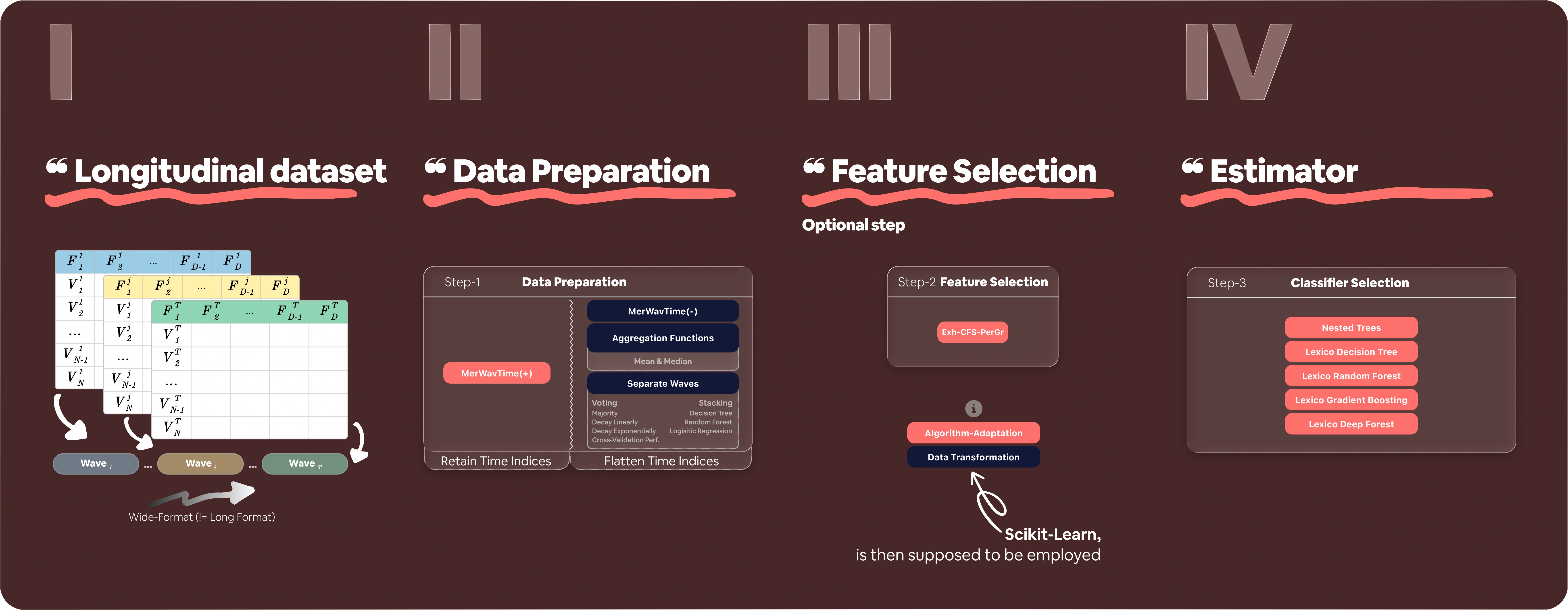
In order to visualise what the library delivers, the figure below shows the high-level flow from raw longitudinal data to the main Sklong available to-pick components.
List of Tutorials
-
Temporal Dependency
Learn how to set up temporal dependencies using
features_groupandnon_longitudinal_features. Essential for allSklongusage. -
Longitudinal Data Format
Understand wide vs. long formats and why
Sklongprefers wide. Includes loading and preparing data. -
Long ⇄ Wide Reshape
Pivot messy long-format cohorts into the wide layout
Sklongexpects (and back) usingLongitudinalDataset.to_wide/to_long. -
Advanced Feature Group (Temporal) Setup
Handle uneven numbers of observations per subject, including missing waves and padded feature groups.
-
Data Preparation: Flatten Temporal Dependency for Scikit-Learn Estimators
Flatten longitudinal structure and plug it into standard estimators using transformations like
AggrFunc. -
Algorithm Adaptation: Preserve Temporal Dependency for Sklong Estimators
Fit and predict with a longitudinal-aware estimator like
LexicoDecisionTreeClassifier. -
Binary vs. Multiclass Classification
Compare the same longitudinal workflow across binary and multiclass targets, including
predict_proba,classes_, and AUPRC evaluation. -
Pipelines: Mix Longitudinal Components
Build a full pipeline combining transformation, preprocessing, and estimation steps.
-
Hyperparameter Tuning: Grid vs. Random Search
Compare grid search and random search for tuning
LexicoRandomForestClassifierhyperparameters. -
Automated Machine Learning (CASH)
Automate model selection and tuning across pipelines with Auto-Sklong.
Dataset Used in Tutorials
All tutorials share the same synthetic health-inspired longitudinal dataset. Generate it once and reuse it across lessons:
import pandas as pd
import numpy as np

n_rows = 500
columns = [
    'age', 'gender',
    'smoke_w1', 'smoke_w2',
    'cholesterol_w1', 'cholesterol_w2',
    'blood_pressure_w1', 'blood_pressure_w2',
    'diabetes_w1', 'diabetes_w2',
    'exercise_w1', 'exercise_w2',
    'obesity_w1', 'obesity_w2',
    'stroke_w2'
]

data = []
for _ in range(n_rows):
    row = {
        'age': np.random.randint(40, 71),
        'gender': np.random.choice([0, 1]),
    }
    for feature in ['smoke', 'cholesterol', 'blood_pressure', 'diabetes', 'exercise', 'obesity']:
        w1 = np.random.choice([0, 1], p=[0.7, 0.3])
        w2 = np.random.choice([0, 1], p=[0.2, 0.8]) if w1 == 1 else np.random.choice([0, 1], p=[0.9, 0.1])
        row[f'{feature}_w1'] = w1
        row[f'{feature}_w2'] = w2

    stroke_risk = row['smoke_w2'] == 1 or row['cholesterol_w2'] == 1 or row['blood_pressure_w2'] == 1
    p_stroke = 0.2 if stroke_risk else 0.05
    row['stroke_w2'] = np.random.choice([0, 1], p=[1 - p_stroke, p_stroke])
    data.append(row)

df = pd.DataFrame(data)
csv_file = './extended_stroke_longitudinal.csv'
df.to_csv(csv_file, index=False)
print(f"Extended CSV file '{csv_file}' created successfully.")
| age | gender | smoke_w1 | smoke_w2 | cholesterol_w1 | cholesterol_w2 | blood_pressure_w1 | blood_pressure_w2 | diabetes_w1 | diabetes_w2 | exercise_w1 | exercise_w2 | obesity_w1 | obesity_w2 | stroke_w2 |
|---|---|---|---|---|---|---|---|---|---|---|---|---|---|---|
| 66 | 0 | 0 | 1 | 0 | 0 | 0 | 0 | 1 | 1 | 0 | 1 | 0 | 0 | 0 |
| 59 | 0 | 0 | 0 | 1 | 1 | 0 | 0 | 1 | 1 | 1 | 1 | 1 | 1 | 1 |
| 63 | 0 | 0 | 0 | 1 | 1 | 0 | 0 | 0 | 0 | 0 | 0 | 0 | 0 | 1 |